Book an appointment and send it to the patient on WhatsApp, free
Tell a patient "come Thursday at six" across the reception desk and there's a fair chance they'll remember Wednesday, or seven. When the time is sitting in their WhatsApp, they can check it on the way, forward it to whoever is bringing them, and reply if something comes up.
FindClinica writes that message for you. Tick one box when you book, and as soon as the appointment is saved, WhatsApp opens on the patient's chat with the doctor, date and time already typed. You press Send. It costs nothing, on any plan. Here's the whole thing on an Android phone, from signing in to that last tap.
Updated
What you need
An Android phone with WhatsApp installed, a Google account to sign in with, and the patient's mobile number. You don't need WhatsApp Business, an API account or an SMS package. The message goes from the WhatsApp already on your phone.
Step 1: Sign in and add your clinic's name
Install FindClinica from Google Play, tap Continue with Google, and fill in your name and mobile number the first time you sign in.
Then open the menu, tap Settings and tap your name at the top of the list (Edit Personal Data). Tap Edit, write your clinic's name in Hospital, and tap Save. That name goes into every appointment message: "your appointment with Dr. Sana Malik at Smile Dental Clinic". If it's empty, the message simply leaves it out.
The phone number in the message is the one you signed up with, so a patient who needs to change the time knows whom to call.
Step 2: Add a doctor
The message names the doctor. With no doctor added you can still book, but the patient would read "Your appointment with is scheduled for…", with a gap where the name should be. Not a good look.
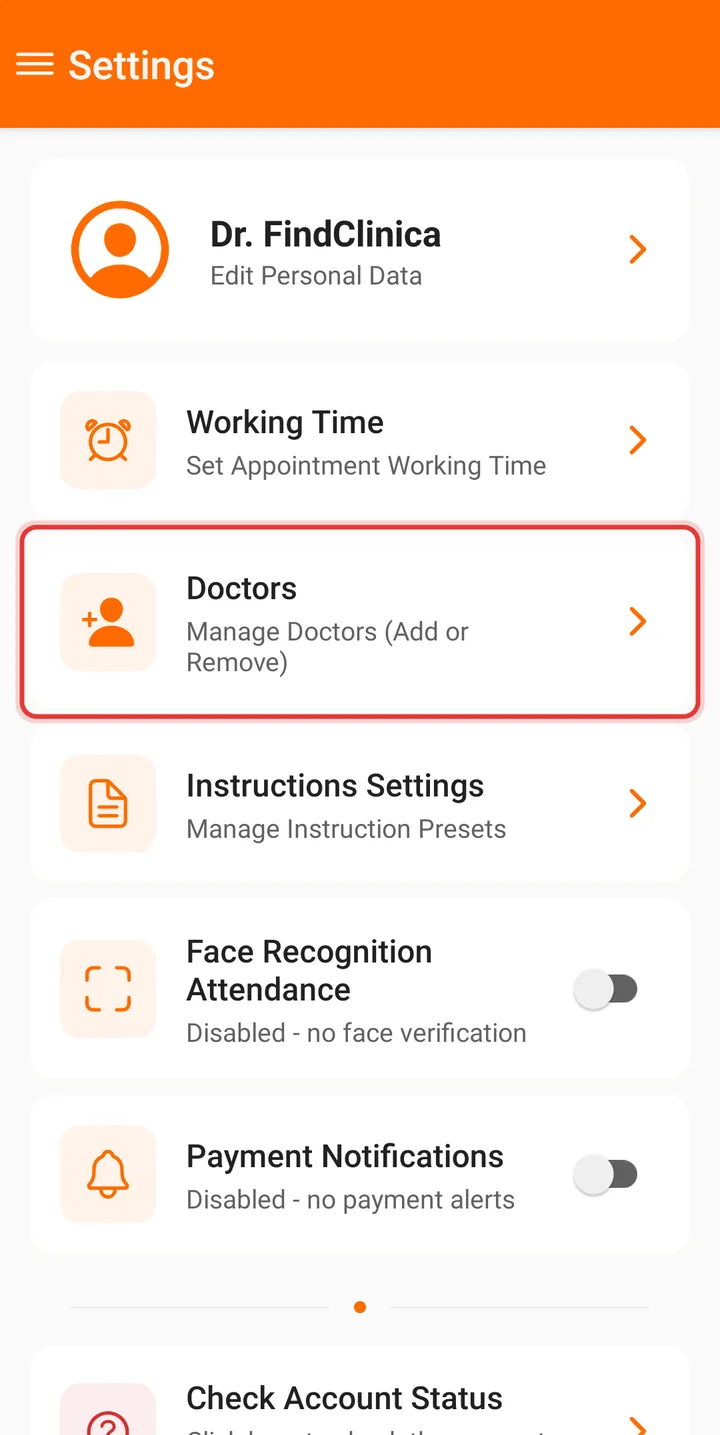
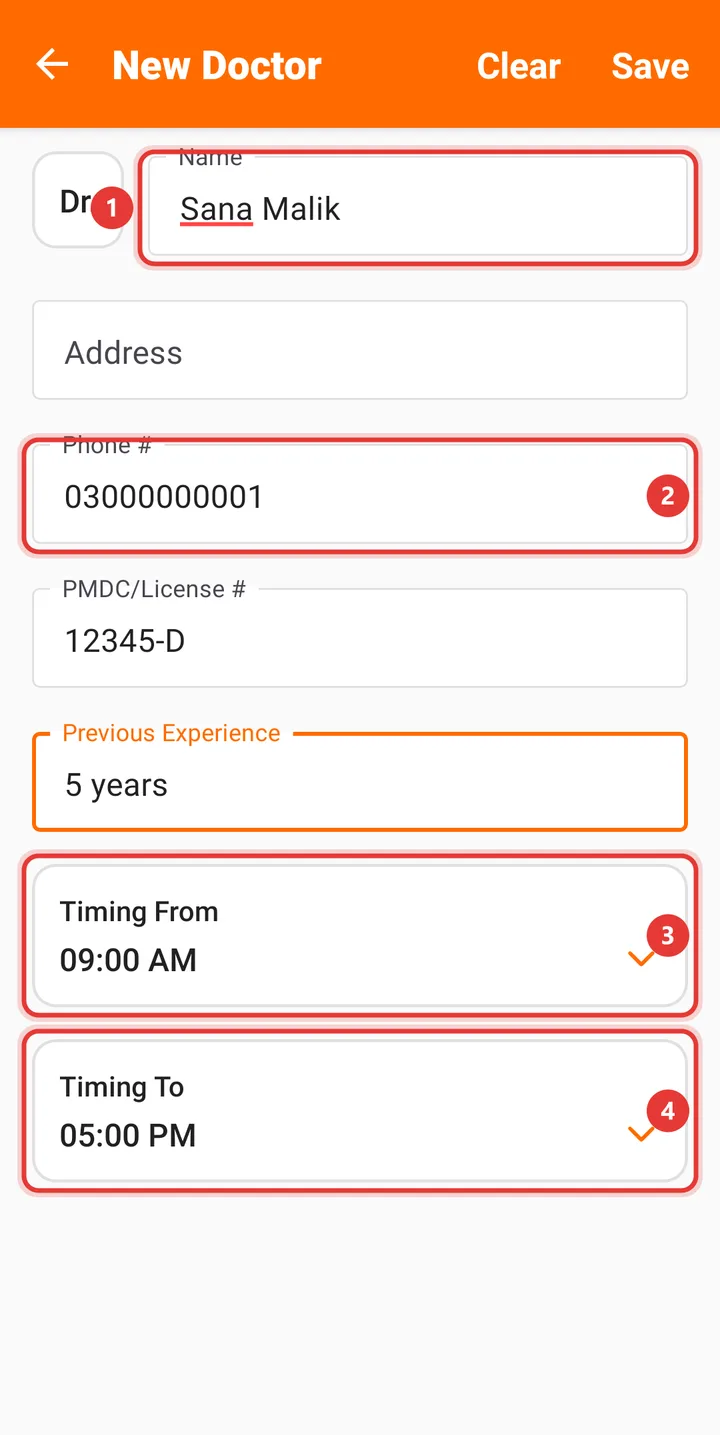
Open the menu, then Settings, Doctors and New Doctor. "Dr." is already picked in the small box on the left, so type only the name (Sana Malik, not Dr. Sana Malik), add the phone and PMDC number if you like, and tap Save. If two doctors share the clinic, add both; you'll pick one each time you book.
Step 3: Check your working hours
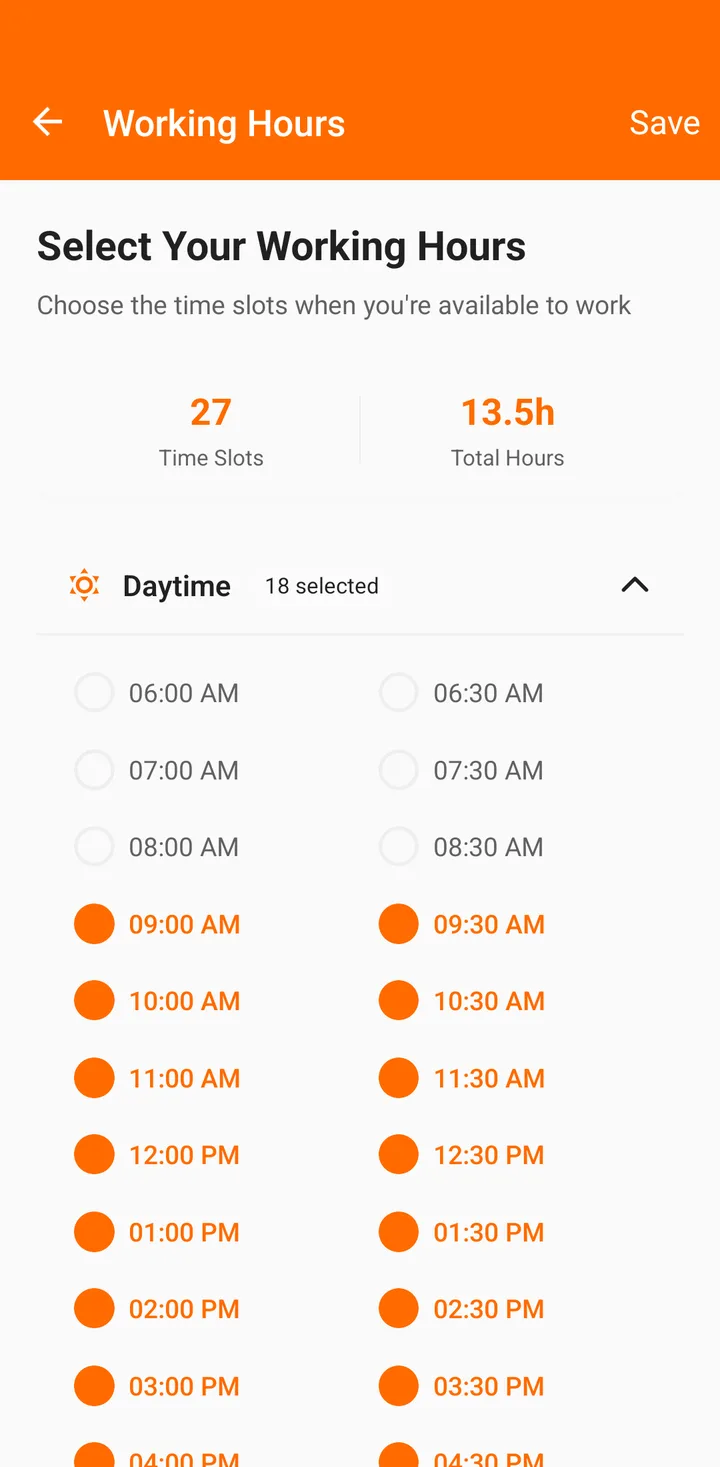
The times you pick from when booking come from Settings, Working Time. Out of the box it's every half hour from 9 in the morning to 10 at night. If your clinic runs from 5 to 9 in the evening, untick the rest, so nobody gets booked at 10 AM when you're at the hospital. Tap Save; this one needs internet.
Working hours are set for the whole clinic, not per doctor, and only the account owner can change them.
Step 4: Open Add Appointment
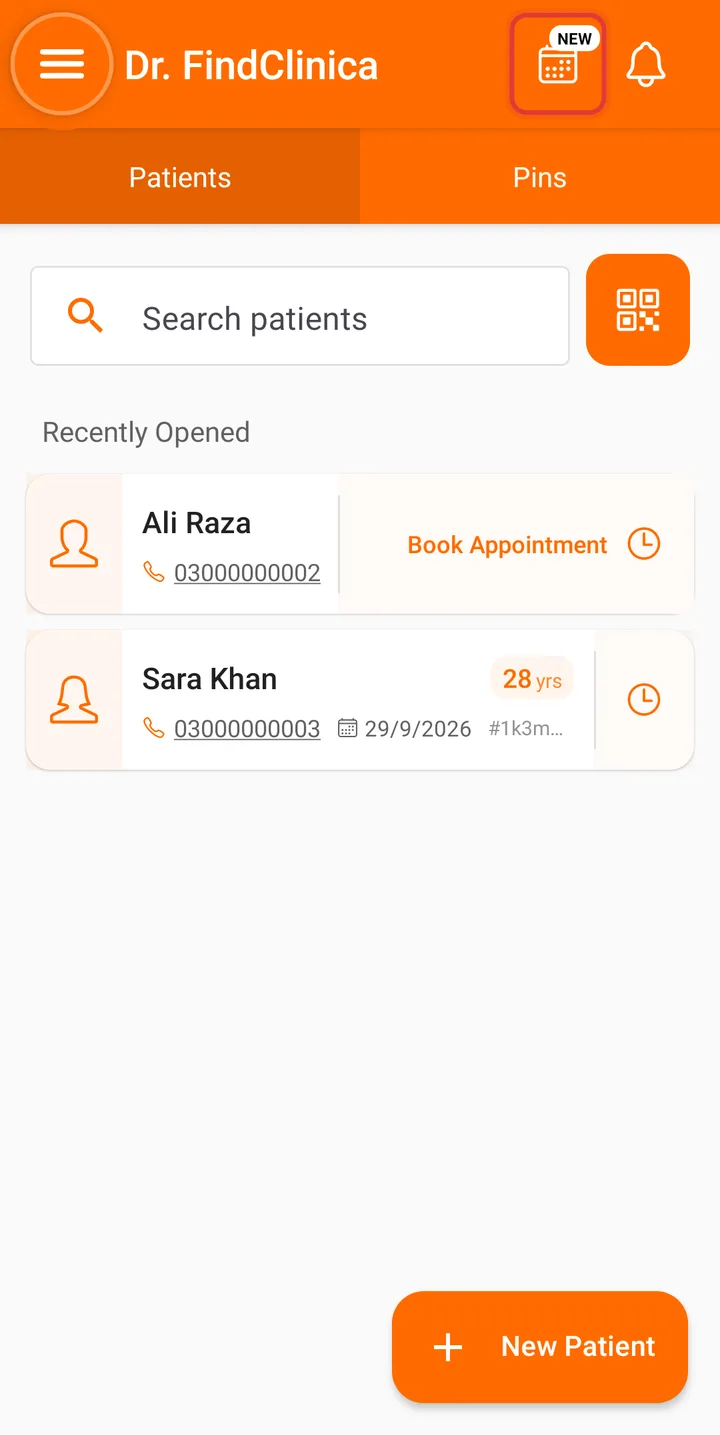
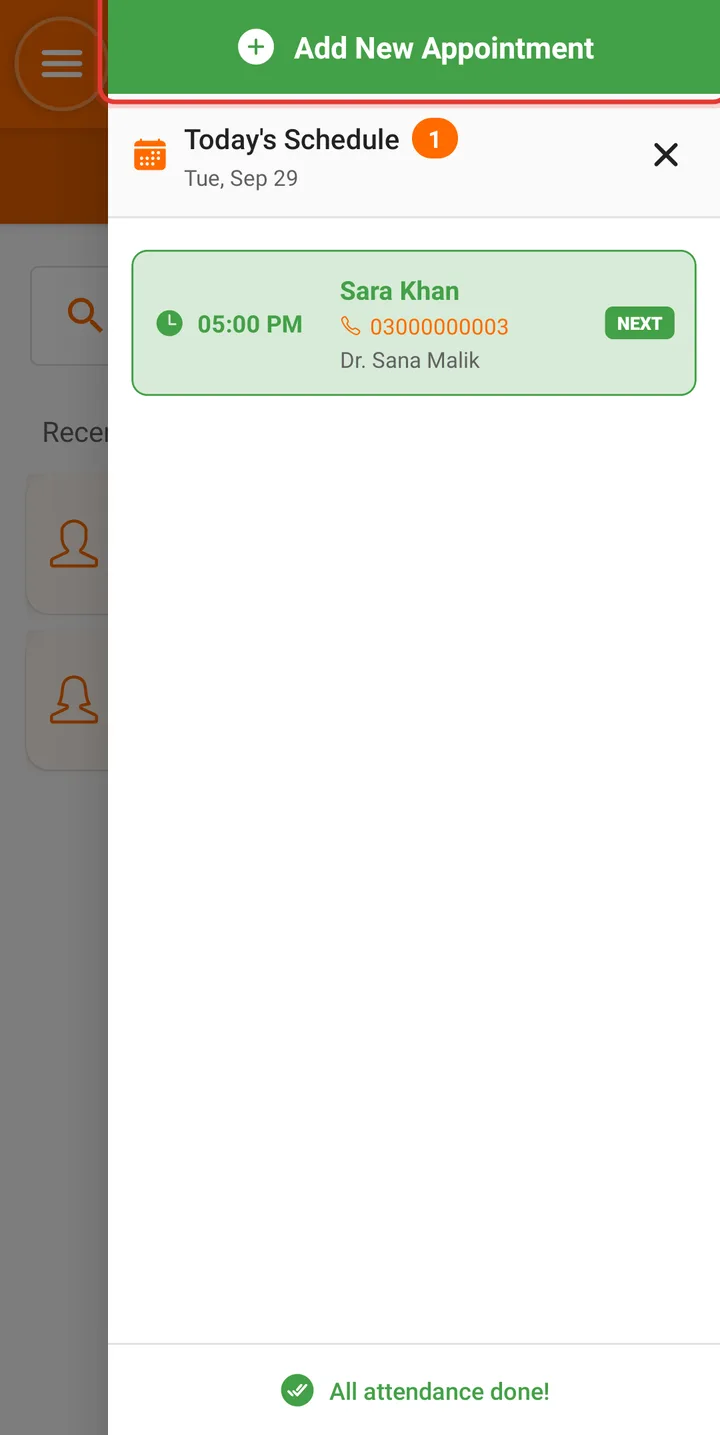
On the home screen, tap the calendar button at the top right (the one with the small NEW badge). Today's Schedule slides in. Tap the green Add New Appointment button at the top.
Step 5: Tick Send message on WhatsApp, then pick a time
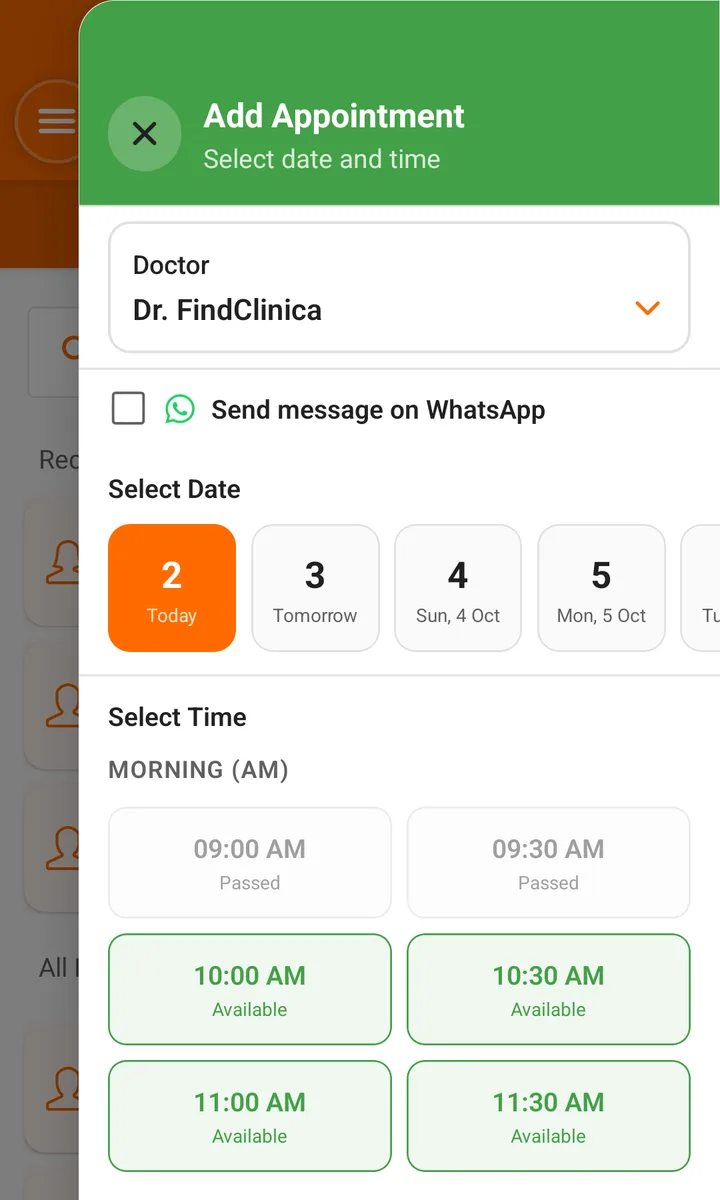
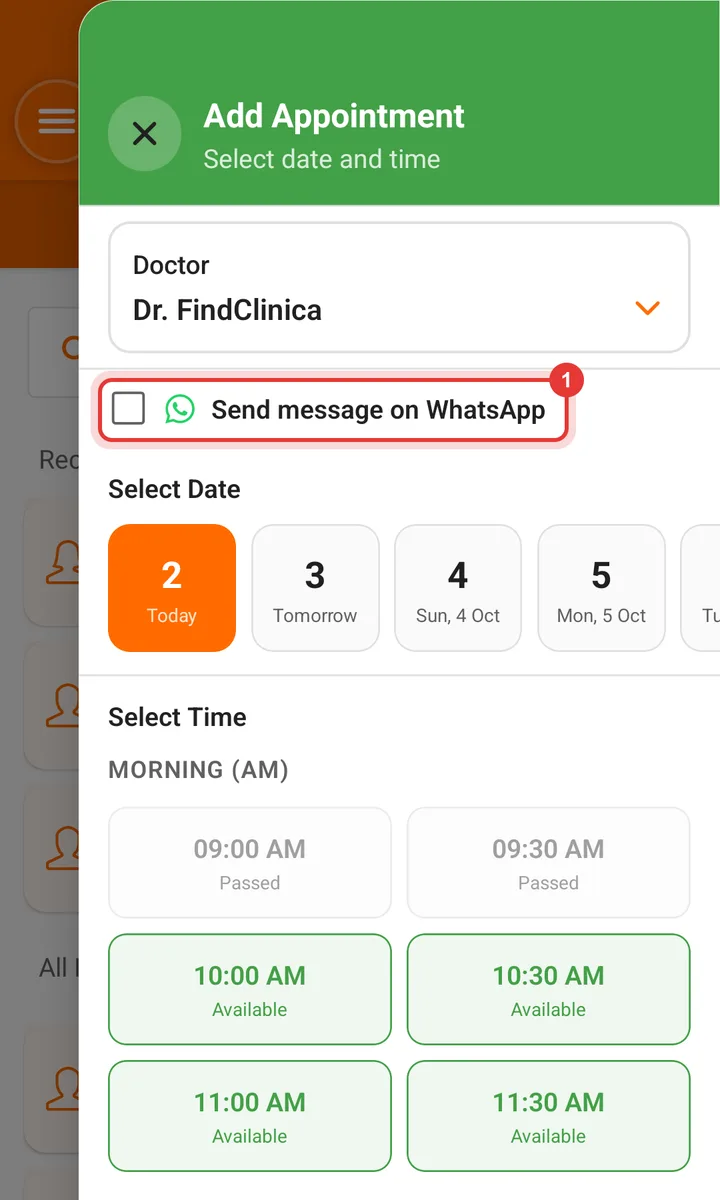
Tick Send message on WhatsApp, just under the doctor. The phone remembers it, so next time it's already ticked.
Check the Doctor, pick the day from the strip (Today, Tomorrow and the weeks after), then tap a green Available time. Grey times have already passed today. Red ones are taken, and show the patient's name.
Step 6: Type the patient's name and number, then Save
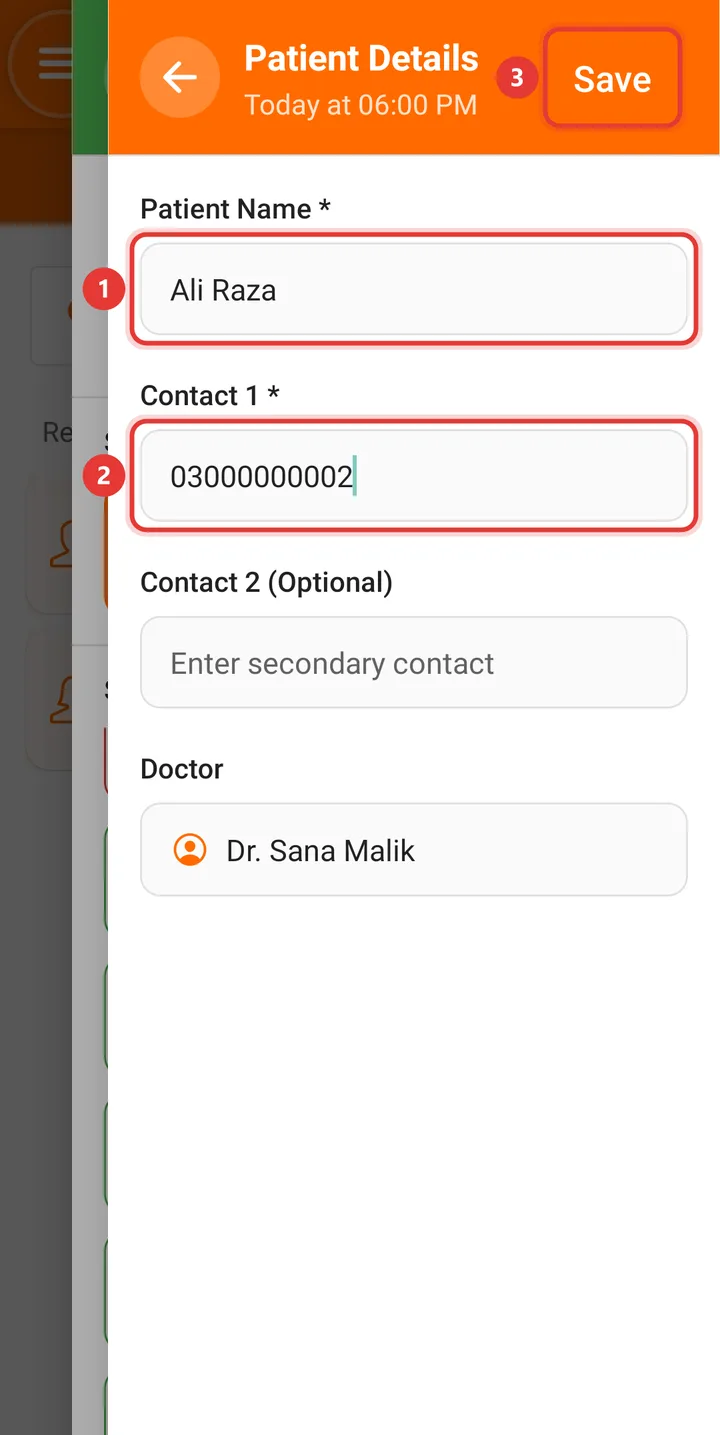
Enter the Patient Name and the number in Contact 1, written the usual way (0300 1234567). The app turns it into +92 for WhatsApp. Tap Save at the top right.
This books the slot without opening a patient file, which suits a phone call from someone new. For a patient who's already in the app there's a quicker way, further down.
Step 7: WhatsApp opens. Press Send
You'll see Appointment created successfully!, and a moment later WhatsApp opens on the patient's chat with this already typed:
Dear Ali Raza, Your appointment with Dr. Sana Malik at Smile Dental Clinic is scheduled for 06:00 PM on 24/10/2026. Please arrive at least 5 minutes early. If you need to reschedule, kindly contact us at +923000000000 in advance. Thank you for choosing our services.
Read it, add anything you like (a line in Urdu, the landmark near your clinic, "bring your old X-ray"), and press Send. Nothing goes out until you do, and it goes from your own number, so the patient can reply to it.
For a patient who's already in the app
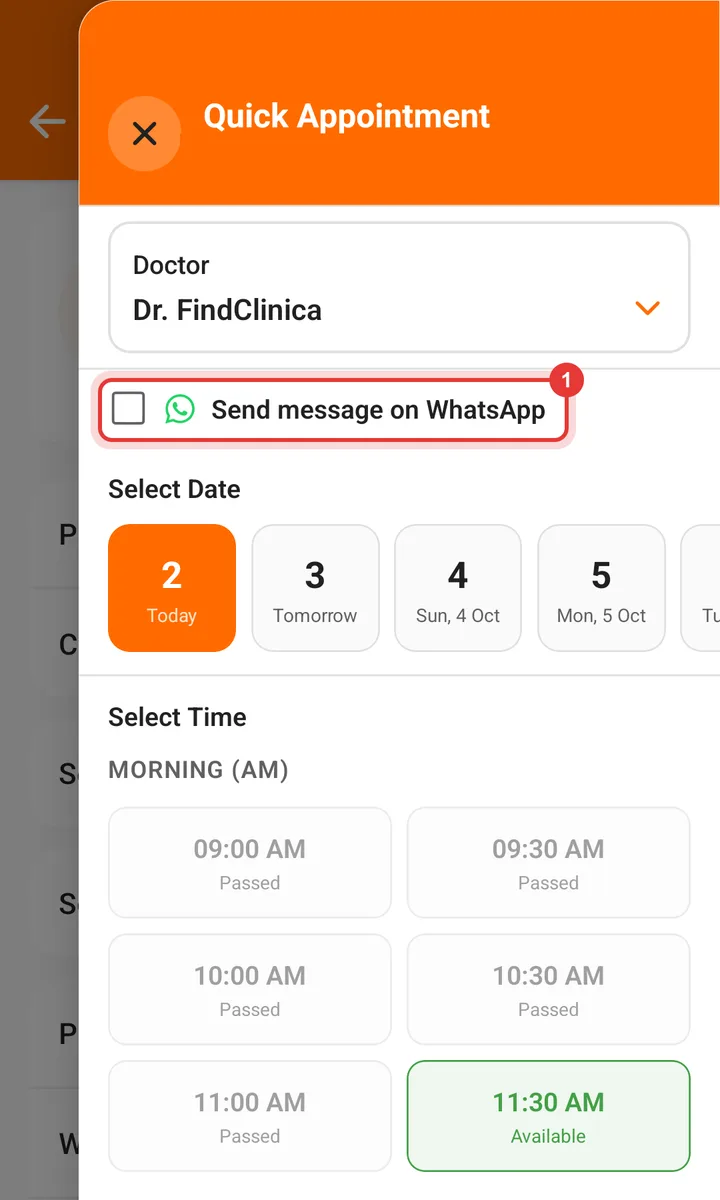
Every patient on the home screen has a small clock button at the right end of the row. Tap it, or open the patient's file and choose Set Appointment from the three-dot menu. The Quick Appointment sheet opens with the same Send message on WhatsApp box.
Tick it before you choose the time. In this sheet a tap on a free time books it straight away (there's no Save button), and WhatsApp opens right after with the patient's name and number already filled in from their file.
The patient gets an SMS as well
Every booking also sends the patient an SMS confirmation from FindClinica by itself, with the same doctor, date and time. It's marked [No Reply], so nobody can answer it.
That's why the WhatsApp message is worth the extra tap. Patients without WhatsApp still get the SMS, and everyone else gets a message they can answer, so "can I come at 7 instead?" reaches you.
What it costs
Nothing. Booking appointments, the WhatsApp message and the SMS confirmation all work on the free plan, and the free plan has no limit on patients. The WhatsApp message goes out through your own WhatsApp, so there's no charge per message. Compare the plans if you want what Pro adds.
A few honest limits
WhatsApp only opens for new bookings. If you move or cancel an appointment, send the patient a note yourself; the appointment reminder message templates have wording for a changed time and a missed visit.
The text the app types is the same every time, and it's in English. You can change it in WhatsApp before pressing Send, but not in the app.
WhatsApp has to be installed on the phone, and the patient needs a number on file. If either is missing, nothing opens. The appointment is still saved.
There's no iPhone app yet. Join the early access list and we'll let you know.
Common questions
Is it really free to send appointment messages on WhatsApp?
Yes. Booking and the WhatsApp message are on the free plan, and the message is sent from your own WhatsApp, so nobody charges you per message.
Does the app send the WhatsApp message by itself?
No. It opens the patient's chat with the message typed in, and you press Send. That way it comes from your number and you see every message before it goes.
Can I change the wording?
Yes, in WhatsApp before you press Send. The app always types the same confirmation; for other messages (reminders, a missed visit, a check-up recall) use the free reminder message templates.
Will the patient also get an SMS?
Yes. Every booking sends an SMS confirmation from FindClinica automatically, whether or not you tick the WhatsApp box.
How do I stop the WhatsApp message for one booking?
Untick Send message on WhatsApp before you book. The phone remembers your choice, so tick it again for the next one.
Do I have to add the patient to the app first?
No. Add New Appointment only needs a name and number. It doesn't open a patient file, so add them with New Patient when they come in.
Read next
- Appointment reminder message templates
- Guide: how to book an appointment
- Guide: how to add a doctor
- Send a prescription on WhatsApp
- Clinic management app for Android
- Software for clinics with several doctors
More for clinics in Pakistan
- Dental Clinic Software in Pakistan
- Clinic Management Software in Pakistan
- EMR Software in Pakistan for Small Clinics
- Prescription Software for Doctors in Pakistan
- Patient Record App for Doctors
- Paper Register vs Excel vs Clinic Software
- Best Clinic Software in Pakistan, Compared
- Clinic Management App for Android
- Clinic Software in Lahore
- Clinic Software in Karachi
- Clinic Software in Islamabad
- Software for Clinics With More Than One Doctor
- Online Prescription Maker: Make a Medical Prescription
- Send a Prescription on WhatsApp for Free
- Software for Orthodontists in Pakistan
- Clinic Software That Works Offline
- How to Read a Periodontal Chart
- Patient Complaint QR Code for Clinics
- Sentinel Event and Incident Reporting for Clinics
- Healthcare Waste Log for Clinics in Pakistan
- Patient Aftercare Instructions on WhatsApp
- Free Clinic Software for Windows
Free tools and templates
Book your next patient with a WhatsApp message
Install FindClinica on your Android phone, add a doctor and book an appointment. The WhatsApp message is ready before the patient has left the desk. Questions? Message us on WhatsApp.