Clinic management software for clinics in Pakistan
Running a small clinic is four jobs at once. You see the patients, and somebody also has to book them, find last year's file, take the fee, note what was spent on supplies and check whether the assistant actually came in today. In most clinics that work is spread across a register, a cupboard of files, a WhatsApp group and one person's memory.
FindClinica puts it in one app. It runs on your Android phone, connects to the Windows computer at reception, and keeps working when the internet drops. The free plan has no limit on patients and includes the desktop app, so you can run the clinic on it and pay only when you want the extras.
Updated
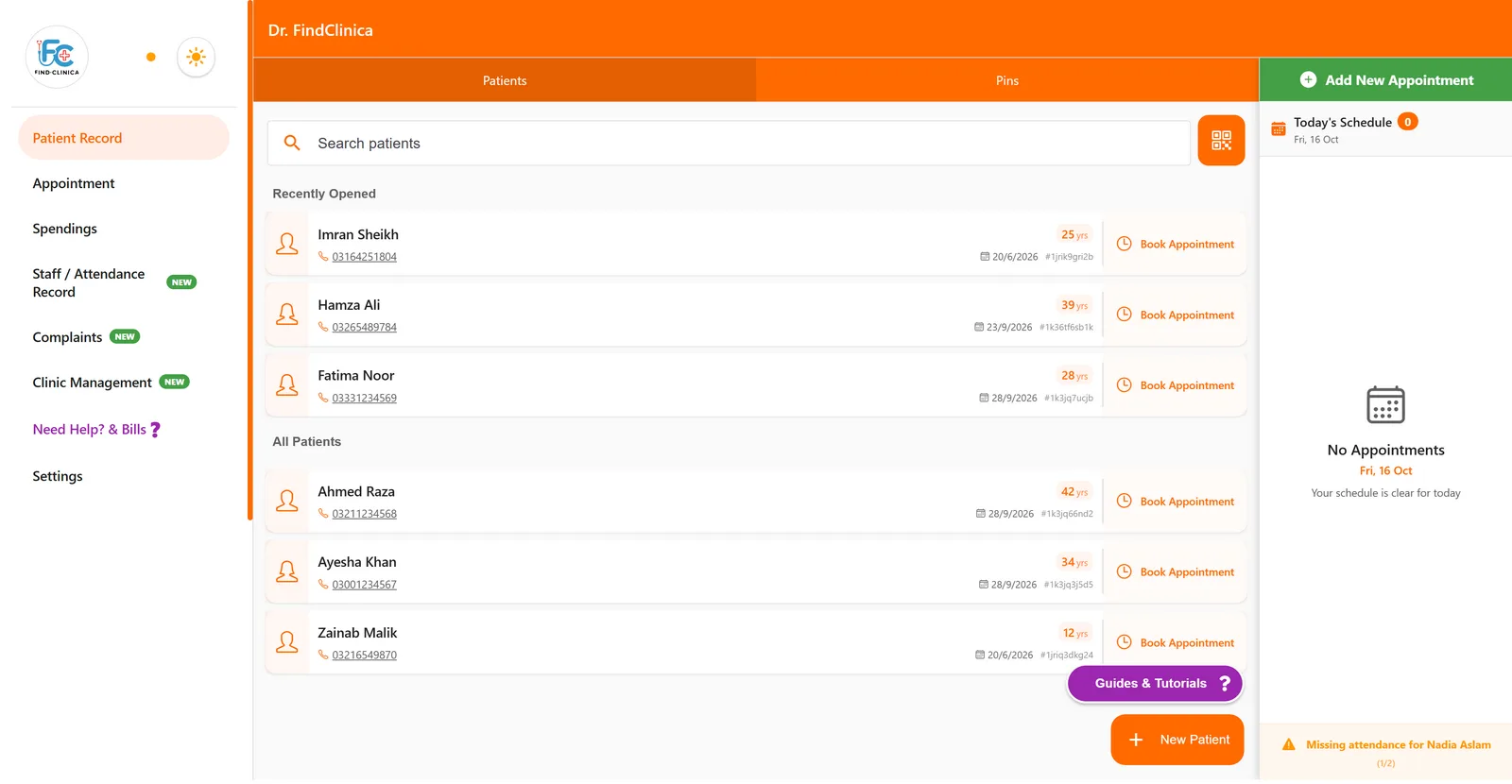
Patient files you can find in two seconds
Type a few letters of the name or part of the phone number and the file comes up. The patients you opened last sit at the top of the list, so the one who just came back from the pharmacy with a question is a single click away.
A new patient takes less than a minute. Name, age, gender and a phone number are enough to start, and the form has room for CNIC, father's name, a second contact, email, address, occupation, referral and health insurance details when you need them. More on replacing the patient register.
Visit notes for any clinic, not only dental
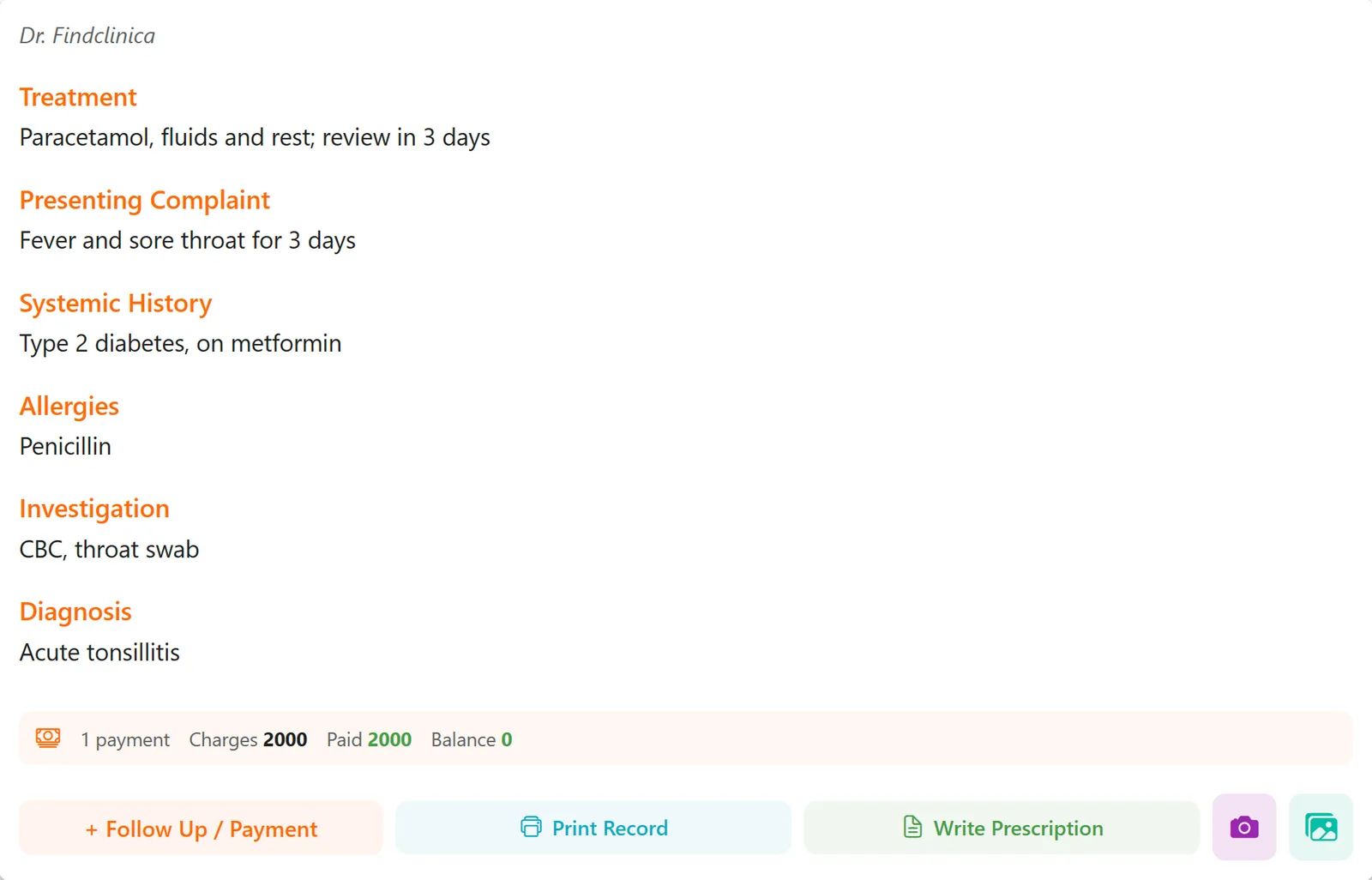
Each visit has the fields a GP or specialist actually fills in: presenting complaint, systemic history, allergies, investigations, diagnosis and treatment, plus the doctor who saw the patient. The fee and what the patient paid go on the same note.
We should be upfront that FindClinica started as dental software, and you can tell. The visit form opens with a tooth chart at the top. If you aren't a dentist you skip it and fill in the fields underneath; nothing needs a tooth to be picked. The suggestions that appear as you type also lean dental at first, but the app remembers what you write and offers it back next time.
Visits stay on the patient's file in date order, as cards or as a table when you want to scan the whole history. How the record works as an EMR.
Appointments, with the SMS sent for you
Book from the phone or from the reception desktop. Your working hours decide which half-hour slots are open, and when more than one doctor works in the clinic you can look at everyone's day or one doctor at a time.
The patient gets an SMS when an appointment is booked, moved or cancelled, and on the paid plans a reminder shortly before the visit. The messages go out through FindClinica, so there is no SMS package to buy and nothing to configure. You can also tick a box to send the patient a WhatsApp message when you book.
Prescriptions without the pad
Add medicines from your own frequent list with their usual dose, or start from a saved set. Doses are written 1+0+1 with the number of days and an instruction such as after meals. The finished prescription carries your name, clinic details and PMDC number, and goes to the patient on WhatsApp or to the printer. How prescriptions work in detail.
Fees, dues and the clinic's own spending
Charges and payments sit on each visit, so part payments and follow-up payments add up by themselves. Open a patient's Payments tab and you see total charges, total paid and what is still owed.
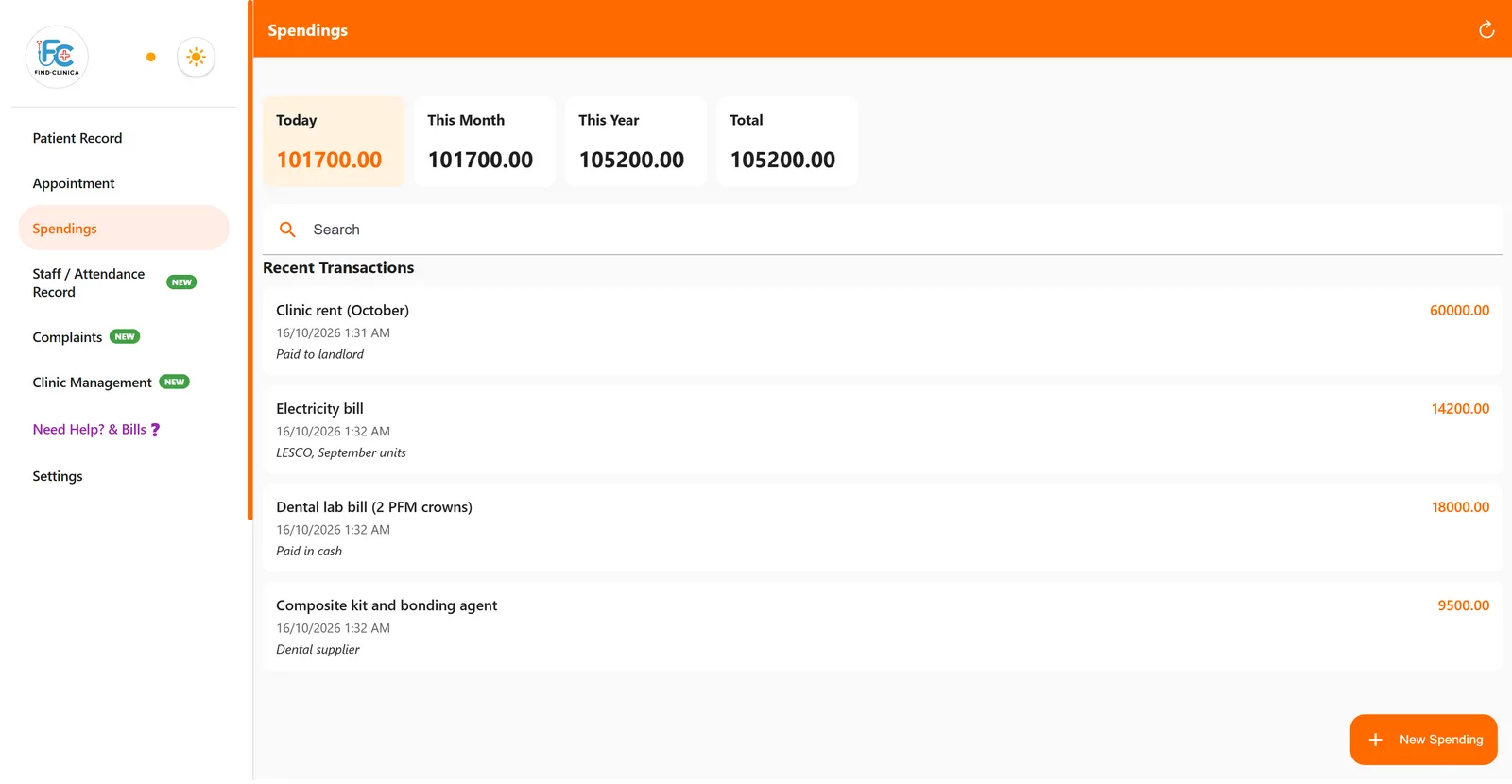
Rent, the electricity bill, lab bills and supplies go into Spendings. The boxes at the top show today, this month, this year and the total, so you can see where the month's money went without a calculator.
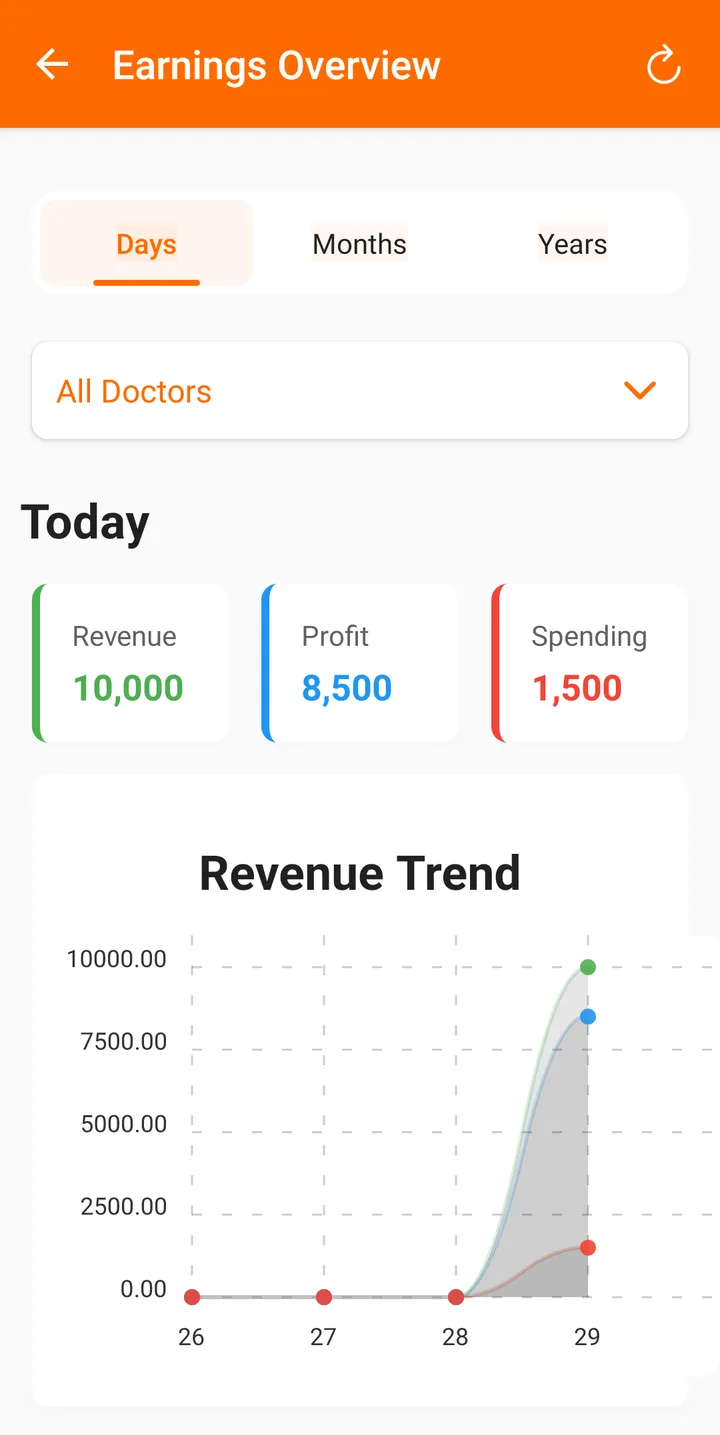
On the phone that owns the account, Statistics puts revenue, spending and profit on a chart by day, month or year, and can show the revenue of one doctor at a time.
Staff attendance and the clinic's registers
Add your receptionist, assistants and other staff with their role and how they are paid (monthly, per day or per procedure). Each day they check in and out, and the app shows who is present, who is still working and who hasn't come. Paid plans can add a face photo at check-in.
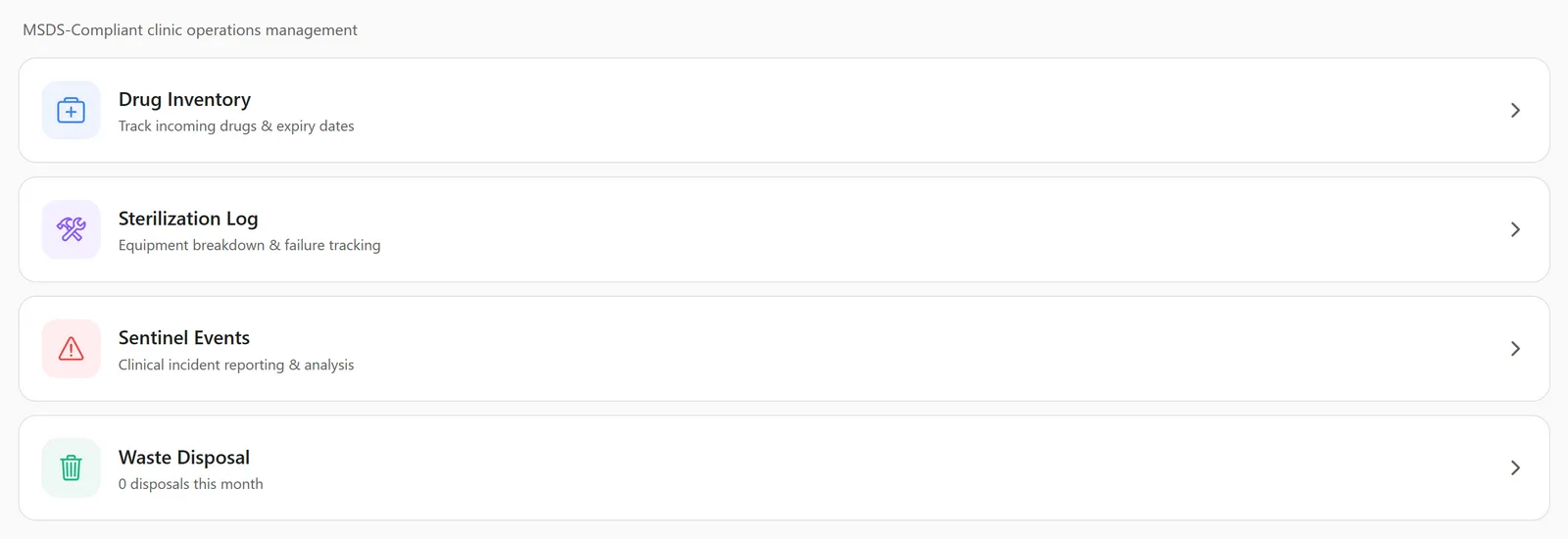
The Clinic Management section keeps the registers that healthcare commission inspections ask about: a drug inventory that shows what is close to expiry, a sterilization log for failed cycles and breakdowns, sentinel events for clinical incidents with their root cause and corrective action, and a waste disposal log. Each one prints as a report.
Patients can also leave feedback by scanning a complaints QR code. Their complaint lands in the app with a status you update as you deal with it, which is a lot easier to show an inspector than a drawer of notes.
Phone first, the reception computer when you need it
Your account lives on your Android phone. When you want the receptionist to work from the clinic computer, install the Windows app there and connect it with a QR code or a short code from your phone. One connected device is included free, and Premium allows three.
A connected computer can look up patients, add visits, book appointments and take payments. It can't edit or delete payments, expenses, staff or doctors, and it can't change your working hours. Those stay with you.
Records are kept on the device and synced to our server, with a full backup every day. Patients, visits and payments can be added with no internet at all; sending a prescription and uploading photos need a connection.
What it costs
The free plan has no limit on patients and includes the desktop app on one connected computer. Pro is PKR 2,000 a month and adds appointment reminders and the expense tracker. Premium is PKR 5,000 a month with more storage and three connected devices.
You pay in rupees by bank transfer or QR code, and paid plans have a 30-day money-back guarantee. Compare the plans.
What it doesn't do
There is no lab or pharmacy integration, no insurance claims and no one-click export of everything to Excel yet; records and registers print as PDFs. The screens are in English. And if you run a hospital with wards and admissions, you need a hospital information system, not this.
Common questions
Can a GP or a specialist use it, or is it only for dentists?
Any outpatient clinic can use it for patient files, visit notes, prescriptions, appointments, fees and staff. The tooth chart and perio chart are there for dentists, and the rest of the app doesn't depend on them.
Can more than one doctor use the same account?
Yes. Add each doctor with their PMDC number and timings. Visits, payments and appointments record which doctor they belong to, and the calendar can show one doctor's day at a time. More for clinics with several doctors.
Will it work during load-shedding?
The phone app keeps working with no internet and syncs when the connection is back. The desktop needs power like any computer, but a dropped connection doesn't stop it either.
Can I bring in my old Excel sheet of patients?
Not yet; there is no import. Most clinics simply add patients as they come in, and within a few months the files they actually use are in the app.
Does the SMS come from my clinic's number?
No. FindClinica sends the confirmation and reminder messages from its own number, so you don't need an SMS service or a spare phone.
How do I pay?
In PKR by bank transfer or QR code. Send the receipt on WhatsApp or email and your account is upgraded within 24 to 48 hours.
Read next
- Everything FindClinica does
- How to add a new patient
- How to book an appointment
- How to record a clinic expense
- How to add a staff member
- Plans and prices
More for clinics in Pakistan
- Dental Clinic Software in Pakistan
- EMR Software in Pakistan for Small Clinics
- Prescription Software for Doctors in Pakistan
- Patient Record App for Doctors
- Paper Register vs Excel vs Clinic Software
- Best Clinic Software in Pakistan, Compared
- Clinic Management App for Android
- Clinic Software in Lahore
- Clinic Software in Karachi
- Clinic Software in Islamabad
- Software for Clinics With More Than One Doctor
- Online Prescription Maker for Doctors
Free tools and templates
Try it with your next patient
The free plan costs nothing and has no time limit. Install it and add one patient, or ask us anything on WhatsApp first.